✦  Staff Productivity

Give your front desk hours back, every day

AI handles the repetitive calls, texts, and paperwork so your team can focus on the patients standing in front of them.

Book a Demo

AI takes the busywork

Routine calls, reminder replies, intake chasing, and FAQ texts run automatically — the desk stops being a call center.

Tasks that route themselves

Follow-ups land with the right person with the patient context attached, instead of a sticky note on a monitor.

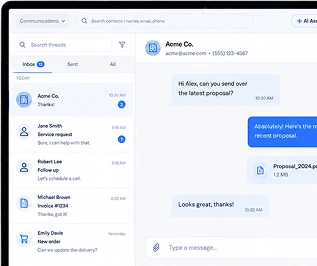
One screen, not five

Phones, texts, schedule, forms, and chat in one platform — the tab-juggling tax disappears.

How it works

1

Map what eats the day

Reminder calls, "are you open?" calls, form chasing, rescheduling — the repetitive 60%.

2

Automate that layer

AI receptionist, auto-reminders, digital forms, and missed-call text back absorb it.

3

Staff do human work

Checking in patients, handling the complex cases, filling the schedule — the work that actually needs people.

What you get

  • AI receptionist absorbs routine call volume
  • Automatic reminders end confirmation-call hours
  • Digital forms end the scan-and-type cycle
  • Missed-call text back stops the redial loop
  • Tasks with patient context — no re-explaining
  • Shorter phone queues, calmer front desk, lower turnover

Common questions

Will this replace my front desk staff?

No — it replaces the worst parts of their job. Practices redeploy the saved hours into patient experience and schedule-filling, which is work that grows revenue.

Where do practices see the biggest time savings first?

Reminder/confirmation calls and routine inbound questions — typically the first week. Digital forms are a close second.

How long does setup take?

Most practices are live in days. We configure the call flows, reminders, and forms around how you already work.

See it on your own practice

15 minutes, your real workflows, no pressure.

Book a Demo