✦  Task Management

HIPAA-compliant task management

Assignments, due dates, checklists, and comments for your whole team, with every task linked to the patient record and protected under HIPAA. Not in group texts and sticky notes.

Get started

Everything a task needs, built for a practice

The basics first: assign it, date it, discuss it, close it. Every task lives next to the patient record it belongs to, so nobody copies a chart into a group text.

Assign to a person or a role

Hand a task to one teammate or to "front desk" and let whoever is on shift pick it up. Reassign in one click when someone is out.

Due dates, priorities, reminders

Every task carries a due date and a priority. Reminders go out before it is late, and an overdue digest goes to the manager when it is.

Subtasks and checklists

Break a new-patient onboarding or a refund into steps. Parent tasks close when the last step does.

Comments, @mentions, attachments

Discuss the task on the task. @mention a provider for a sign-off, attach the form or the call recording, and the whole thread stays with the patient.

Recurring templates

Weekly recall calls, monthly insurance follow-ups, end-of-day close-out: build the checklist once and it schedules itself.

Boards, filters, and spaces

A space per location or team, saved filters like "mine, due this week", and a board view for the morning huddle. Desktop and mobile.

Why it is HIPAA compliant

Trello, Asana, and group texts are not built to hold protected health information. KloudMD task management is part of the same platform that runs your patient communication, so the controls are already there.

Role-based access

Staff see the tasks, patients, and locations their role allows. Permissions are set per user, and a task on a patient is only visible to people who can see that patient.

A full audit trail

Every view and change of patient data is logged with who, when, and from where. Task edits, reassignments, and comments keep their history; nothing is silently deleted.

Encrypted in transit and at rest

Task content, comments, and attachments are encrypted the same way as your calls, texts, and forms, on infrastructure covered by our HIPAA, SOC 2 Type II, and ISO 27001 program.

PHI stays inside the platform

Tasks link to the patient record instead of copying it. Notifications tell your team a task needs them; the details stay behind the login, not in an email inbox or a chat app.

How it works

1

Work arrives

Calls, bookings, forms, payments, and review requests land in KloudMD already attached to a patient.

2

Tasks route to the right person

By person or by role, with a due date, so nothing sits in a shared inbox waiting for a volunteer.

3

Nothing falls through

Snooze, reassign, comment, close. Overdue work surfaces instead of quietly disappearing.

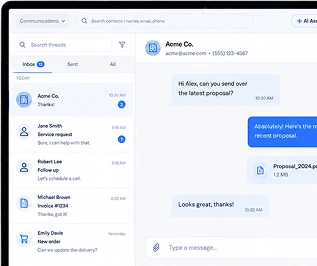
KloudMD inbox and tasks

What you get

  • Integrates with your EHR/EMR
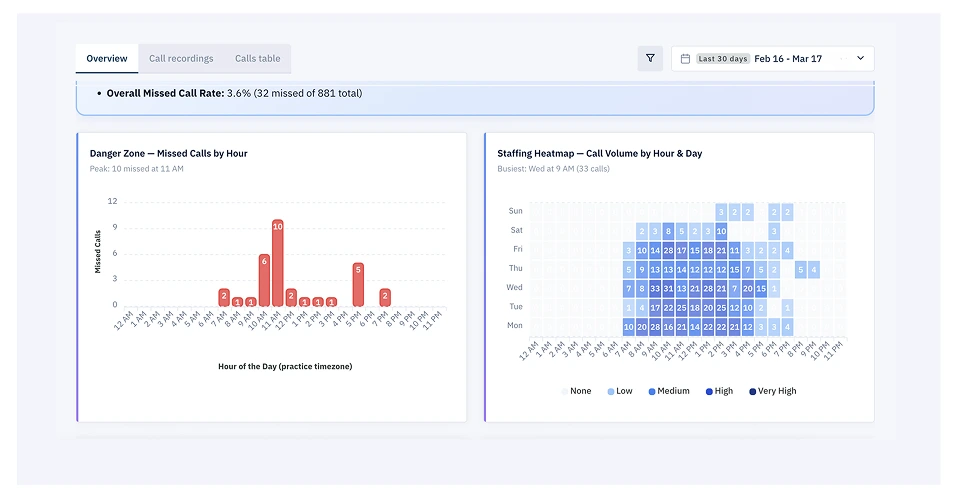
  • Tasks auto-created from calls, bookings, forms, and payments
  • Assignment by person or role, with due dates
  • @mentions and comments, with notifications
  • Snooze with full history — no silent disappearances
  • Every task linked to the patient record it came from
  • Role-based access and an activity trail on patient data
  • Works on desktop and in the mobile app
KloudMD missed-call queue that becomes tasks

Common questions

Is your task management HIPAA compliant?

Yes. Tasks live inside the same HIPAA-compliant platform as your patient data, with role-based access and an activity trail. Patient details stay in the record instead of being copied into texts or a general-purpose to-do app.

How is this different from Asana, Trello, or Monday?

Those are general project tools with no patient context. KloudMD tasks are created by what actually happens in your practice — a missed call, a new booking, an unsigned form — and stay linked to the patient they concern.

Do we have to create every task by hand?

You can create tasks manually, but most create themselves from platform events, which is where the time savings come from.

See it on your own practice

15 minutes, your real workflows, no pressure.

Get started